Loading...
Searching...
No Matches
Value
#include <Ultralight/js/Value.h>
Overview
A handle to a live JavaScript value.
A Value represents a live JavaScript value on a page. You use it to hold page objects and functions across calls, interacting with them directly without converting them to C++ types.
This example interacts with an object on the page:
player["score"] = 1200; // write
player["respawn"](10, 20); // call a method (`this` is player)
Handle States
A handle is always in one of these states:
| State | When | operator bool | Calls |
|---|---|---|---|
| Valid | On a live page | true | Work normally |
| Empty | Default-constructed, moved from, or failed read | false | Do nothing |
| Gone | Page navigated, frame removed, or View destroyed | false | Do nothing |
An empty Value differs from JavaScript null and undefined. A missing property reads as a valid Value holding undefined, while an empty handle represents an uninitialized handle or a failed operation.
Every operation is safe in all three states, allowing property reads and method calls to chain without checking each step.
This call chains safely even if the HUD object doesn't exist:
ctx["hud"]["showToast"]("Saved"); // does nothing if there's no hud
When an operation returns a failed js::Result, inspect js::Error::is_empty() to check for an empty handle or js::Error::is_page_gone() to check whether the page navigated away.
A handle whose page is gone never recovers, even when that page is restored from the back-forward cache.
To interact with the new page, get a new Value from that page's js::Context. Every page-lifetime handle across the JavaScript API follows these rules.
Copies and Lifetimes
Copying a Value creates another reference to the same JavaScript value.
Holding a Value keeps the underlying JavaScript value from being garbage-collected, but it doesn't keep the page or its View alive.
For ownership cycles between bound instances and JavaScript objects, see js::ClassBuilder.
A const Value still lets you change the underlying JavaScript value, matching the behavior of a const RefPtr.
Type Conversions
The conversion methods To(), Maybe(), and Or() are strict about the JavaScript type (the string "7" doesn't convert to a number), differing only in how they report a failure.
To convert values using JavaScript's own coercion rules, call ToNumber(), ToString(), ToBoolean(), or ToJSON() directly on the Value. For the full list of supported types, see js::TypeTraits.
This example compares strict conversion against JavaScript coercion:
Result< double > ToNumber() const
Convert to a number using JavaScript's rules.
Definition Value.h:354
Values Across Pages
A Value belongs to the page that created it. You can pass a Value directly only between frames of the same top-level page that share an exact origin, never across separate Views.
Using a Value on a page that can't take it fails with a TypeError whose error code is ULJS_CROSS_CONTEXT. To transfer data between separate pages or Views, copy the data using JSON or native C++ types.
This example transfers player data to a page in another View using JSON:
js::Context bestiary(bestiary_view.get()); // a page in another View
std::string json = player.ToJSON().value_or("null");
bestiary["player"] = js::OrEmpty(bestiary.MakeFromJSON(json));
Result< std::string > ToJSON(unsigned indent=0) const
Convert to JSON text like JSON.stringify() does.
Definition Value.h:413
T OrEmpty(Result< T > result)
Get a Result's value, or a default-constructed T if it holds an error.
Definition Error.h:539
- Note
- js::Value and dom::data::Value are unrelated types (dom::data::Value is the value type of the data-binding API).
- See also
- js::Context, js::Error, js::TypeTraits, js::WeakValue
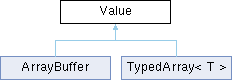
Inheritance diagram for Value:
Classes | |
| class | Ref |
| A reference to a property of a Value (returned by Value::operator[]). More... | |
Static Public Member Functions | |
| static Value | Adopt (ULJSValue handle) |
| Take ownership of a handle from the C API without adding a reference. | |
| static Value | FromBorrowed (ULJSValue handle) |
| Add a reference to a handle the library owns (eg, a callback argument) so it can outlive the callback. | |
Public Member Functions | |
| Value () | |
| Create an empty Value. | |
| Value (const Value &other) | |
| Copy constructor (adds a reference to the same JavaScript value). | |
| Value (Value &&other) noexcept | |
| Move constructor (other becomes empty). | |
| Value & | operator= (Value other) noexcept |
| Assignment (copies or moves other into this Value). | |
| ~Value () | |
| Destructor (releases this handle). | |
| operator bool () const | |
| Whether or not this Value is valid (it isn't empty and its page is still alive). | |
| bool | IsEmpty () const |
| Whether or not this Value holds nothing (see "Handle States" above). | |
| bool | IsAlive () const |
| Whether or not this Value's page is still alive (the same test as operator bool). | |
| Type | type () const |
| Get the type of the value. | |
| bool | IsUndefined () const |
| Whether or not the value is undefined. | |
| bool | IsNull () const |
| Whether or not the value is null. | |
| bool | IsNullish () const |
| Whether or not the value is null or undefined. | |
| bool | IsBoolean () const |
| Whether or not the value is a boolean. | |
| bool | IsNumber () const |
| Whether or not the value is a number. | |
| bool | IsBigInt () const |
| Whether or not the value is a BigInt (eg, 10n). | |
| bool | IsString () const |
| Whether or not the value is a string. | |
| bool | IsObject () const |
| Whether or not the value is an object. | |
| bool | IsArray () const |
| Whether or not the value is an Array. | |
| bool | IsCallable () const |
| Whether or not the value can be called (see Call() and Invoke()). | |
| bool | IsFunction () const |
| Whether or not the value is a function. | |
| bool | IsPromise () const |
| Whether or not the value is a Promise. | |
| Result< bool > | ToBoolean () const |
| Convert to a boolean using JavaScript's rules (this never runs script). | |
| Result< double > | ToNumber () const |
| Convert to a number using JavaScript's rules. | |
| Result< std::string > | ToString () const |
| Convert to a UTF-8 string using JavaScript's rules. | |
| Result< std::string > | ToJSON (unsigned indent=0) const |
| Convert to JSON text like JSON.stringify() does. | |
| Result< Value > | GetProperty (const char *name) const |
| Get a property of this object (own or inherited). | |
| bool | Has (const char *name) const |
| Whether or not this object has a property (own or inherited). | |
| Result< bool > | HasProperty (const char *name) const |
| Whether or not this object has a property (like Has(), but reports failures). | |
| Result< void > | SetProperty (const char *name, const Value &value, PropertyAttributes attributes=PropertyAttributes::None) const |
| Set a property of this object. | |
| Result< Value > | Call (const Value &this_value, const Value *args, size_t argc) const |
| Call this value as a function. | |
| Result< Value > | Call (const Value &this_value, std::span< const Value > args) const |
| Call this value as a function with the arguments in a range (eg, a std::vector<js::Value>). | |
| template<typename T> | |
| Result< T > | To () const |
| Convert to a C++ type. | |
| template<typename T> | |
| std::optional< T > | Maybe () const |
| Convert to a C++ type like To() but without the failure reason. | |
| template<typename T> | |
| T | Or (T fallback) const |
| Convert to a C++ type like To() but with a fallback. | |
| std::string | Or (const char *fallback) const |
| Convert to a std::string like To() but with a string-literal fallback. | |
| template<typename R = Value, typename... A> | |
| Result< R > | Invoke (A &&... args) const |
| Call this value as a function with typed arguments and result. | |
| template<typename R = Value, typename... A> | |
| Result< R > | InvokeOn (const Value &this_value, A &&... args) const |
| Call this value as a function with an explicit this (otherwise the same as Invoke()). | |
| template<typename... A> | |
| Result< Value > | operator() (A &&... args) const |
| Call this value as a function: on_save(path) is the same as on_save.Invoke(path). | |
| template<typename F> | |
| bool | Then (F &&on_settled) const |
| Wait for this promise to settle without a coroutine. | |
| template<typename T, typename F> requires (!std::is_same_v<T, Value>) | |
| bool | Then (F &&on_settled) const |
| Wait for this promise to settle and convert its value to a C++ type. | |
| Ref | operator[] (const char *name) const |
| Access a property to read, assign, or call it. | |
| template<typename I> requires (std::is_integral_v<I> && !std::is_same_v<I, bool>) | |
| Ref | operator[] (I index) const |
| ULJSValue | raw () const |
| Get the C API handle without transferring ownership. | |
| ULJSValue | LeakRef () |
| Give up ownership of the C API handle and return it (like RefPtr::LeakRef()). | |
Protected Member Functions | |
| Value (ULJSValue handle) | |
Constructor & Destructor Documentation
◆ Value() [1/4]
|
inline |
Create an empty Value.
◆ Value() [2/4]
|
inline |
Copy constructor (adds a reference to the same JavaScript value).
◆ Value() [3/4]
|
inlinenoexcept |
Move constructor (other becomes empty).
◆ ~Value()
|
inline |
Destructor (releases this handle).
◆ Value() [4/4]
|
inlineexplicitprotected |
Member Function Documentation
◆ Adopt()
|
inlinestatic |
Take ownership of a handle from the C API without adding a reference.
Use this for a handle you'd otherwise destroy with ulDestroyJSValue() (eg, the return value of a C function).
- Parameters
-
handle The handle to take ownership of.
- Returns
- Returns a Value that owns handle.
- Note
- For a handle the library owns (eg, a callback argument), use FromBorrowed().
◆ Call() [1/2]
|
inlinenodiscard |
Call this value as a function.
- Parameters
-
this_value The this value for the call (an empty Value uses the global object). args The arguments (an empty Value passes undefined). argc The number of entries in args.
- Returns
- Returns the function's return value. Fails with a JavaScript exception if the call throws or this value can't be called.
◆ Call() [2/2]
◆ FromBorrowed()
|
inlinestatic |
◆ GetProperty()
Get a property of this object (own or inherited).
- Parameters
-
name The property name (NULL is treated as "").
- Returns
- Returns the property value (undefined if there's no such property). Fails with a JavaScript exception if a getter throws.
◆ Has()
|
inline |
Whether or not this object has a property (own or inherited).
Unlike reading the property, this returns true for a property set to undefined. It doesn't run getters.
- Parameters
-
name The property name (NULL is treated as "").
- Note
- Any failure returns false. Use HasProperty() if you need the reason.
◆ HasProperty()
|
inlinenodiscard |
Whether or not this object has a property (like Has(), but reports failures).
- Parameters
-
name The property name (NULL is treated as "").
- Returns
- Returns whether the property exists. Fails with a JavaScript exception if the check throws (eg, in a Proxy's has handler).
◆ Invoke()
template<typename R = Value, typename... A>
| Result< R > Invoke | ( | A &&... | args | ) | const |
Call this value as a function with typed arguments and result.
The arguments and the result (when you give R) convert through js::TypeTraits:
fn.Invoke(path); // result left as a js::Value
Expected< T, Error > Result
The result of a JavaScript operation that can fail: a T or a js::Error.
Definition Error.h:520
- Parameters
-
args The arguments to pass to the function.
- Returns
- Returns the call's result converted to R. Fails with a JavaScript exception if the call throws, or with a TypeError if the result doesn't convert to R.
- Note
- The function's this is the global object. To call a method on an object, call through operator[] (obj["m"](x)) or use InvokeOn().
◆ InvokeOn()
template<typename R = Value, typename... A>
| Result< R > InvokeOn | ( | const Value & | this_value, |
| A &&... | args ) const |
Call this value as a function with an explicit this (otherwise the same as Invoke()).
js::Result<js::Value> row = fn.InvokeOn(receiver, 42);
ContainerSpec< Children... > row(ContainerOptions options, Children... children)
Describe a row container with child elements.
Definition Builder.h:125
- Parameters
-
this_value The this value for the call. args The arguments to pass to the function.
- Returns
- Returns the call's result and fails the same way as Invoke().
◆ IsAlive()
|
inline |
◆ IsArray()
|
inline |
Whether or not the value is an Array.
◆ IsBigInt()
|
inline |
Whether or not the value is a BigInt (eg, 10n).
◆ IsBoolean()
|
inline |
Whether or not the value is a boolean.
◆ IsCallable()
◆ IsEmpty()
|
inline |
Whether or not this Value holds nothing (see "Handle States" above).
◆ IsFunction()
|
inline |
Whether or not the value is a function.
- Note
- A few callable objects aren't functions (eg, the constructor of a native class). Use IsCallable() to check whether you can call a value.
◆ IsNull()
|
inline |
Whether or not the value is null.
◆ IsNullish()
◆ IsNumber()
|
inline |
Whether or not the value is a number.
◆ IsObject()
|
inline |
Whether or not the value is an object.
Arrays and functions are objects too (use IsArray() or IsFunction() to tell them apart).
◆ IsPromise()
|
inline |
Whether or not the value is a Promise.
This has no side effects: the promise isn't marked as handled.
◆ IsString()
|
inline |
Whether or not the value is a string.
◆ IsUndefined()
|
inline |
Whether or not the value is undefined.
◆ LeakRef()
|
inline |
Give up ownership of the C API handle and return it (like RefPtr::LeakRef()).
- Returns
- Returns the handle. You must destroy it with ulDestroyJSValue() when finished.
◆ Maybe()
template<typename T>
|
nodiscard |
Convert to a C++ type like To() but without the failure reason.
- Returns
- Returns the converted value or nullopt on any failure.
◆ operator bool()
|
inlineexplicit |
Whether or not this Value is valid (it isn't empty and its page is still alive).
◆ operator()()
Call this value as a function: on_save(path) is the same as on_save.Invoke(path).
- Parameters
-
args The arguments to pass to the function.
- Returns
- Returns the call's result and fails the same way as Invoke().
◆ operator=()
◆ operator[]() [1/2]
|
inline |
Access a property to read, assign, or call it.
double volume = settings["volume"].Or(0.0);
settings["volume"] = 5.0;
settings["save"]("slot1"); // method call: `this` = settings
A read that fails (the Value is empty or its page is gone, it holds null or undefined, or a getter throws) gives you an empty Value instead of an error, like JavaScript's optional chaining. Use GetProperty() or SetProperty() when you need the reason.
- Parameters
-
name The property name.
- Returns
- Returns a Value::Ref for the property.
- Note
- A missing property reads as a valid undefined Value (operator bool returns true). Use Has() to check whether a property exists.
- Note
- You can also index with any integer type (eg, arr[2]). A negative index reads the property with that name as JavaScript does (arr[-1] reads "-1").
◆ operator[]() [2/2]
template<typename I>
requires (std::is_integral_v<I> && !std::is_same_v<I, bool>)
requires (std::is_integral_v<I> && !std::is_same_v<I, bool>)
| Value::Ref operator[] | ( | I | index | ) | const |
◆ Or() [1/2]
|
nodiscard |
Convert to a std::string like To() but with a string-literal fallback.
- Parameters
-
fallback The text to return if the conversion fails.
- Returns
- Returns the converted string or fallback on any failure.
◆ Or() [2/2]
template<typename T>
|
nodiscard |
Convert to a C++ type like To() but with a fallback.
- Parameters
-
fallback The value to return if the conversion fails.
- Returns
- Returns the converted value or fallback on any failure.
- Note
- The fallback's type is the type converted to, so pass 0.0 (not 0) to read a number that can have a fraction: Or(0) converts to int and fails on 3.5.
◆ raw()
|
inline |
Get the C API handle without transferring ownership.
- Returns
- Returns the handle for use with the <Ultralight/CAPI/CAPI_JSValue.h> functions.
◆ SetProperty()
|
inlinenodiscard |
Set a property of this object.
obj.SetProperty("id", ctx.Make(7.0),
@ DontDelete
Script can't delete it.
Definition Value.h:76
@ ReadOnly
Script can't change its value.
Definition Value.h:74
- Parameters
-
name The property name (NULL is treated as ""). value The value to assign (an empty Value assigns undefined). attributes The flags combined with |. They only apply if this creates the property (see PropertyAttributes).
- Returns
- Returns success. Fails with a JavaScript exception if a setter throws.
- Note
- Like an assignment in non-strict JavaScript, a write the object refuses (a frozen object, or a read-only property) is silently ignored and still returns success.
◆ Then() [1/2]
template<typename T, typename F>
requires (!std::is_same_v<T, Value>)
requires (!std::is_same_v<T, Value>)
|
inlinenodiscard |
Wait for this promise to settle and convert its value to a C++ type.
- Parameters
-
on_settled A callable that takes a js::Result<T>.
- Returns
- Returns true if this value is a Promise and on_settled will run (see Then()).
- Note
- If the value doesn't convert to T (see To()), on_settled gets the TypeError.
◆ Then() [2/2]
template<typename F>
|
inlinenodiscard |
Wait for this promise to settle without a coroutine.
on_settled runs once on the Renderer's thread during a later Renderer::Update(). Its Result holds the promise's value or an Error with the rejection reason. If the page goes away first, it gets a page-gone Error instead, so it always runs.
// Page: myApp.nativeReady(fetch('/level.json').then(r => r.json()));
api["nativeReady"] = [](js::Value promise) {
bool waiting = promise.Then([](js::Result<js::Value> r) {
if (r)
LoadLevel(*r); // fulfilled: r holds the value
else if (!r.error().is_page_gone())
Log(r.error().message()); // rejected: r.error() holds the reason
});
if (!waiting)
Log("nativeReady expects a Promise");
};
- Parameters
-
on_settled A callable that takes a js::Result<js::Value>.
- Returns
- Returns true if this value is a Promise and on_settled will run. Otherwise it returns false and destroys on_settled without running it.
- Note
- A rejection you wait for this way counts as handled, so the page doesn't report it as unhandled.
- Note
- In a coroutine, use co_await js::Await<T>(promise) instead (see <Ultralight/js/Task.h>).
◆ To()
template<typename T>
|
nodiscard |
Convert to a C++ type.
This works for every type js::TypeTraits supports: numbers, strings, containers, optionals, variants, reflected structs and enums, and your own specializations. The value must already have the matching JavaScript type (see "Type Conversions" above).
// To walk an array or an object's entries, convert to a container of js::Value:
auto items = arr.To<std::vector<js::Value>>().value_or({});
auto entries = obj.To<std::map<std::string, js::Value>>().value_or({});
An integer type needs a whole number in its range, so To<int>() on 3.5 fails instead of truncating.
- Returns
- Returns the converted value. Fails with a TypeError (code ULJS_BAD_ARG) if the value doesn't have the requested type. Its message says where and why, like a bound function's (eg, "volume: expected number, got 'loud'").
- Note
- Requires <Ultralight/js/TypeTraits.h> (or any header that includes it).
◆ ToBoolean()
|
inlinenodiscard |
Convert to a boolean using JavaScript's rules (this never runs script).
- Returns
- Returns the boolean.
◆ ToJSON()
|
inlinenodiscard |
Convert to JSON text like JSON.stringify() does.
- Parameters
-
indent The number of spaces to indent each level by (0 for compact output, at most 10).
◆ ToNumber()
|
inlinenodiscard |
Convert to a number using JavaScript's rules.
- Returns
- Returns the number. Fails with a JavaScript exception if the conversion throws (eg, a valueOf() method throws or the value is a Symbol).
◆ ToString()
|
inlinenodiscard |
Convert to a UTF-8 string using JavaScript's rules.
- Returns
- Returns the string. Fails with a JavaScript exception if the conversion throws (eg, a toString() method throws or the value is a Symbol).
◆ type()
|
inline |
Get the type of the value.
- Returns
- Returns the value's type (Type::Invalid for an empty Value or one whose page is gone).
The documentation for this class was generated from the following file:
- Ultralight/js/Value.h