Loading...
Searching...
No Matches
Element
#include <Ultralight/dom/Element.h>
Overview
A handle to an element on a page.
dom::Element is a safe handle to an element on a page, providing direct access to document content and events from C++. Its syntax matches JavaScript's DOM, and it doesn't require JavaScript to be enabled.
You can store handles in native objects to update your interface when application state changes, or attach callbacks to respond to user interactions.
This example updates an element and listens for a click:
hud.classList.add("visible");
hud.style.width = dom::StyleValue::Pct(42);
detail::StringProp< detail::TextContentTag > textContent
The text of this element and all its descendants (textContent).
Definition Element.h:216
EventListener addEventListener(std::string_view type, F &&callback, const AddEventListenerOptions &options={}) const
Listen for an event on this element (addEventListener).
Definition Element.h:1540
Element querySelector(std::string_view selectors) const
Find the first element below this one that matches a CSS selector (querySelector).
Definition Element.h:410
Element parentElement() const
Get the element's parent element (parentElement).
Definition Element.h:1231
detail::ClassListProxy classList
The element's classes (classList).
Definition Element.h:195
detail::StyleProxy style
The element's inline style (style).
Definition Element.h:179
static constexpr StyleValue Pct(double v)
Create a percentage (%).
Definition StyleValue.h:240
Handle Lifetime
Copying a handle creates another reference to the same element rather than duplicating the element itself.
A handle keeps its element alive in memory for as long as its page lives, even after calling remove() to take it out of the document tree.
Handle States
A handle's status depends on whether it holds an element and whether its page remains active:
- Valid handles point to an element on an active page. Operations on them run normally.
- Empty handles hold no element. Default-constructed handles, moved-from handles, and queries that match nothing are empty, and calls on them do nothing.
- Gone handles hold elements whose page was destroyed, navigated away, or had its frame removed. Calls on them do nothing.
Every call is safe in any state, so you can chain operations without null checks:
document.querySelector("#save").click(); // does nothing if there's no match
A handle whose page is gone never becomes valid again, even if that page comes back from the back-forward cache. Every DOM handle follows these lifetime and safety rules.
Inspecting Failures
To find out why an operation failed, pass dom::Checked as an extra argument to return a dom::Result holding a dom::Error. A misspelled selector yields an empty handle, so subsequent calls do nothing silently unless Config::diagnostics.dom is set to DiagnosticsLevel::Strict.
Typed Element Views
You can narrow a generic element to a specific control type using helper methods like AsInput(), AsTextArea(), and AsSelect(). An As*() view returns an empty handle if the element has a different tag.
Converting an element to an input gives access to tag-specific properties:
name_input.placeholder = "Your name";
HTMLInputElement AsInput() const
Get this element as an <input> (HTMLInputElement).
Definition Element.h:3398
detail::StringProp< detail::PlaceholderTag > placeholder
The input's placeholder attribute (placeholder), the hint it shows while it's empty.
Definition Element.h:2205
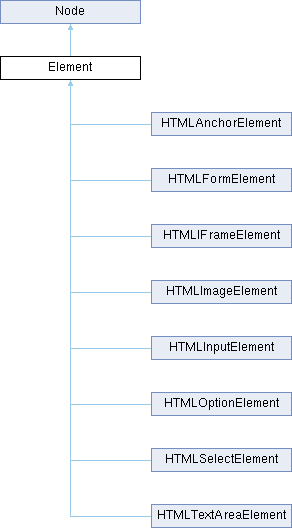
Inheritance diagram for Element:
Static Public Member Functions | |
| static Element | Adopt (ULDOMElement handle) |
| Wrap a C handle you own, taking ownership of it. | |
| static Element | FromBorrowed (ULDOMElement handle) |
| Wrap a C handle the library owns (eg, a callback argument), adding a reference. | |
| Static Public Member Functions inherited from Node | |
| static Node | Adopt (ULDOMNode handle) |
| Wrap a C handle you own, taking ownership of it. | |
| static Node | FromBorrowed (ULDOMNode handle) |
| Wrap a C handle the library owns (eg, a callback argument), adding a reference. | |
Public Member Functions | |
| Element () | |
| Create an empty Element. | |
| Element (const Element &other) | |
| Copy constructor (both handles refer to the same element). | |
| Element (Element &&other) noexcept | |
| Move constructor (other becomes empty). | |
| Element & | operator= (Element other) noexcept |
| Assignment (copies or moves). | |
| Element | querySelector (std::string_view selectors) const |
| Find the first element below this one that matches a CSS selector (querySelector). | |
| Result< Element > | querySelector (std::string_view selectors, Checked_t) const |
| Same as querySelector(), but returns a Result with the reason for a failure (eg, a SyntaxError for a malformed selector). | |
| ElementList | querySelectorAll (std::string_view selectors) const |
| Find every element below this one that matches a CSS selector (querySelectorAll). | |
| Result< ElementList > | querySelectorAll (std::string_view selectors, Checked_t) const |
| Same as querySelectorAll(), but returns a Result with the reason for a failure (eg, a SyntaxError for a malformed selector). | |
| bool | matches (std::string_view selectors) const |
| Whether or not this element matches a CSS selector (matches). | |
| Result< bool > | matches (std::string_view selectors, Checked_t) const |
| Same as matches(), but returns a Result with the reason for a failure (eg, a SyntaxError for a malformed selector). | |
| Element | closest (std::string_view selectors) const |
| Find the closest ancestor that matches a CSS selector, starting with this element itself (closest). | |
| Result< Element > | closest (std::string_view selectors, Checked_t) const |
| Same as closest(), but returns a Result with the reason for a failure (eg, a SyntaxError for a malformed selector). | |
| std::optional< std::string > | getAttribute (std::string_view name) const |
| Get an attribute's value (getAttribute). | |
| bool | hasAttribute (std::string_view name) const |
| Whether or not the element has an attribute (hasAttribute). | |
| void | setAttribute (std::string_view name, std::string_view new_value) const |
| Set an attribute's value (setAttribute). | |
| void | removeAttribute (std::string_view name) const |
| Remove an attribute (removeAttribute). | |
| bool | toggleAttribute (std::string_view name) const |
| Toggle an attribute (toggleAttribute). | |
| bool | toggleAttribute (std::string_view name, bool force) const |
| Add or remove an attribute (toggleAttribute with force). | |
| std::vector< std::string > | getAttributeNames () const |
| Get the names of the element's attributes in order (getAttributeNames). | |
| bool | contains (const Element &other) const |
| Whether or not another element is this element or one of its descendants (contains). | |
| ElementList | children () const |
| Get the element's child elements in order (children). | |
| Element | appendChild (const Element &child) const |
| Add an element as the last child of this element (appendChild). | |
| Result< Element > | appendChild (const Element &child, Checked_t) const |
| Same as appendChild(), but returns a Result with the reason for a failure (eg, a HierarchyRequestError for a cycle). | |
| Node | appendChild (const Node &child) const |
| Add a node of any kind as the last child of this element (appendChild). | |
| Result< Node > | appendChild (const Node &child, Checked_t) const |
| Same as appendChild() with a Node, but returns a Result with the reason for a failure (eg, a HierarchyRequestError for a cycle). | |
| void | appendChild (const DocumentFragment &fragment) const |
| Move all of a fragment's children to the end of this element (appendChild). | |
| Result< void > | appendChild (const DocumentFragment &fragment, Checked_t) const |
| Same as appendChild() with a fragment, but returns a Result with the reason for a failure. | |
| template<typename... T> requires ((detail::NodeOrString<T> && ...)) | |
| void | append (T &&... nodes) const |
| Add nodes and strings to the end of this element, after its last child (append). | |
| template<typename... T> requires ((detail::NodeOrString<T> && ...)) | |
| Result< void > | append (Checked_t, T &&... nodes) const |
| Same as append(), but returns a Result with the reason for a failure (eg, a HierarchyRequestError for a cycle). | |
| template<typename... T> requires ((detail::NodeOrString<T> && ...)) | |
| void | prepend (T &&... nodes) const |
| Add nodes and strings to the start of this element, before its first child (prepend). | |
| template<typename... T> requires ((detail::NodeOrString<T> && ...)) | |
| Result< void > | prepend (Checked_t, T &&... nodes) const |
| Same as prepend(), but returns a Result with the reason for a failure (eg, a HierarchyRequestError for a cycle). | |
| template<typename... T> requires ((detail::NodeOrString<T> && ...)) | |
| void | replaceChildren (T &&... new_children) const |
| Replace all of this element's children with nodes and strings (replaceChildren). | |
| template<typename... T> requires ((detail::NodeOrString<T> && ...)) | |
| Result< void > | replaceChildren (Checked_t, T &&... new_children) const |
| Same as replaceChildren(), but returns a Result with the reason for a failure (eg, a HierarchyRequestError for a cycle). | |
| Element | insertBefore (const Element &child, const Element &ref_child) const |
| Insert an element before one of this element's children (insertBefore). | |
| Result< Element > | insertBefore (const Element &child, const Element &ref_child, Checked_t) const |
| Same as insertBefore(), but returns a Result with the reason for a failure (eg, a NotFoundError when ref_child isn't a child of this element). | |
| Node | insertBefore (const Node &child, const Node &ref_child) const |
| Insert a node of any kind before one of this element's children (insertBefore). | |
| Result< Node > | insertBefore (const Node &child, const Node &ref_child, Checked_t) const |
| Same as insertBefore() with Nodes, but returns a Result with the reason for a failure (eg, a NotFoundError when ref_child isn't a child of this element). | |
| Element | replaceChild (const Element &new_child, const Element &old_child) const |
| Replace one of this element's children with another element (replaceChild). | |
| Result< Element > | replaceChild (const Element &new_child, const Element &old_child, Checked_t) const |
| Same as replaceChild(), but returns a Result with the reason for a failure (eg, a NotFoundError when old_child isn't a child of this element). | |
| Node | replaceChild (const Node &new_child, const Node &old_child) const |
| Replace one of this element's children, of any kind, with a node of any kind (replaceChild). | |
| Result< Node > | replaceChild (const Node &new_child, const Node &old_child, Checked_t) const |
| Same as replaceChild() with Nodes, but returns a Result with the reason for a failure (eg, a NotFoundError when old_child isn't a child of this element). | |
| Element | removeChild (const Element &child) const |
| Remove one of this element's children (removeChild). | |
| Result< Element > | removeChild (const Element &child, Checked_t) const |
| Same as removeChild(), but returns a Result with the reason for a failure (eg, a NotFoundError when child isn't a child of this element). | |
| Node | removeChild (const Node &child) const |
| Remove one of this element's children, of any kind (removeChild). | |
| Result< Node > | removeChild (const Node &child, Checked_t) const |
| Same as removeChild() with a Node, but returns a Result with the reason for a failure (eg, a NotFoundError when child isn't a child of this element). | |
| Element | cloneNode (bool deep=false) const |
| Copy this element (cloneNode). | |
| void | insertAdjacentHTML (std::string_view position, std::string_view html) const |
| Parse markup and insert it relative to this element (insertAdjacentHTML). | |
| Result< void > | insertAdjacentHTML (std::string_view position, std::string_view html, Checked_t) const |
| Same as insertAdjacentHTML(), but returns a Result with the reason for a failure (eg, a SyntaxError for an unknown position). | |
| Element | insertAdjacentElement (std::string_view position, const Element &other) const |
| Insert an element relative to this element (insertAdjacentElement). | |
| Result< Element > | insertAdjacentElement (std::string_view position, const Element &other, Checked_t) const |
| Same as insertAdjacentElement(), but returns a Result with the reason for a failure (eg, a SyntaxError for an unknown position). | |
| void | insertAdjacentText (std::string_view position, std::string_view text) const |
| Insert text relative to this element (insertAdjacentText). | |
| Result< void > | insertAdjacentText (std::string_view position, std::string_view text, Checked_t) const |
| Same as insertAdjacentText(), but returns a Result with the reason for a failure (eg, a SyntaxError for an unknown position). | |
| std::string | tagName () const |
| Get the element's tag name (tagName). | |
| Element | parentElement () const |
| Get the element's parent element (parentElement). | |
| Element | firstElementChild () const |
| Get the element's first child element (firstElementChild). | |
| Element | lastElementChild () const |
| Get the element's last child element (lastElementChild). | |
| Element | nextElementSibling () const |
| Get the element's next sibling element (nextElementSibling). | |
| Element | previousElementSibling () const |
| Get the element's previous sibling element (previousElementSibling). | |
| size_t | childElementCount () const |
| Get the number of the element's child elements (childElementCount). | |
| Document | ownerDocument () const |
| Get the document this element belongs to (ownerDocument). | |
| DOMRect | getBoundingClientRect () const |
| Get the element's bounding rectangle relative to the viewport (getBoundingClientRect). | |
| int | offsetWidth () const |
| Get the element's width in CSS pixels, including its padding and borders (offsetWidth). | |
| int | offsetHeight () const |
| Get the element's height in CSS pixels, including its padding and borders (offsetHeight). | |
| int | offsetTop () const |
| Get the distance from the element's top border edge to its offsetParent()'s top padding edge, in CSS pixels (offsetTop). | |
| int | offsetLeft () const |
| Get the distance from the element's left border edge to its offsetParent()'s left padding edge, in CSS pixels (offsetLeft). | |
| Element | offsetParent () const |
| Get the element that offsetTop() and offsetLeft() measure from (offsetParent). | |
| int | clientWidth () const |
| Get the element's inner width in CSS pixels, including its padding but not its borders or scrollbar (clientWidth). | |
| int | clientHeight () const |
| Get the element's inner height in CSS pixels, including its padding but not its borders or scrollbar (clientHeight). | |
| int | clientTop () const |
| Get the width of the element's top border, in CSS pixels (clientTop). | |
| int | clientLeft () const |
| Get the width of the element's left border, in CSS pixels (clientLeft). | |
| int | scrollWidth () const |
| Get the width of the element's content in CSS pixels, including any part scrolled out of view (scrollWidth). | |
| int | scrollHeight () const |
| Get the height of the element's content in CSS pixels, including any part scrolled out of view (scrollHeight). | |
| void | scrollIntoView (bool align_to_top=true) const |
| Scroll the element's ancestors so the element is visible (scrollIntoView). | |
| void | scrollTo (double x, double y) const |
| Scroll the element's content to a position (scrollTo). | |
| void | scrollBy (double x, double y) const |
| Scroll the element's content by an offset (scrollBy). | |
| void | focus () const |
| Give the element keyboard focus (focus). | |
| void | blur () const |
| Remove keyboard focus from the element (blur). | |
| void | click () const |
| Click the element (click). | |
| bool | dispatchEvent (std::string_view type, const EventInit &init={}) const |
| Dispatch a synthetic event to this element (dispatchEvent). | |
| bool | dispatchCustomEvent (std::string_view type, std::string_view event_detail, const EventInit &init={}) const |
| Dispatch a synthetic CustomEvent with a string payload to this element. | |
| template<typename F> | |
| EventListener | addEventListener (std::string_view type, F &&callback, const AddEventListenerOptions &options={}) const |
| Listen for an event on this element (addEventListener). | |
| template<typename F> | |
| EventListener | addEventListener (std::string_view type, F &&callback, EventListenerFlags flags) const |
| Listen for an event on this element, with options as flags (eg, dom::Once | dom::Capture). | |
| template<typename C, typename M> requires (std::is_class_v<C> && std::is_member_function_pointer_v<M> && !LockableHolder<C>) | |
| EventListener | addEventListener (std::string_view type, C &receiver, M method, const AddEventListenerOptions &options={}) const |
| Listen by calling a member function on an object you keep alive. | |
| template<typename C, typename M> requires (std::is_class_v<C> && std::is_member_function_pointer_v<M> && !LockableHolder<C>) | |
| EventListener | addEventListener (std::string_view type, C &receiver, M method, EventListenerFlags flags) const |
| Listen by calling a member function on an object you keep alive, with options as flags. | |
| template<typename H, typename M> requires (LockableHolder<H> && std::is_member_function_pointer_v<M>) | |
| EventListener | addEventListener (std::string_view type, H holder, M method, const AddEventListenerOptions &options={}) const |
| Listen by calling a member function through a smart pointer that's checked before each call. | |
| template<typename H, typename M> requires (LockableHolder<H> && std::is_member_function_pointer_v<M>) | |
| EventListener | addEventListener (std::string_view type, H holder, M method, EventListenerFlags flags) const |
| Listen by calling a member function through a smart pointer, with options as flags. | |
| template<typename F> | |
| EventListener | On (std::string_view selector, std::string_view type, F &&callback, const AddEventListenerOptions &options={}) const |
| Listen for an event on the elements inside this one that match a CSS selector, including elements added later (event delegation). | |
| template<typename F> | |
| EventListener | On (std::string_view selector, std::string_view type, F &&callback, EventListenerFlags flags) const |
| Listen for an event on matching elements, with options as flags (see the options overload). | |
| template<typename F> | |
| Result< EventListener > | On (std::string_view selector, std::string_view type, F &&callback, const AddEventListenerOptions &options, Checked_t) const |
| Same as On(), but returns a Result with the reason for a failure (eg, a SyntaxError for a malformed selector). | |
| template<typename F> | |
| Result< EventListener > | On (std::string_view selector, std::string_view type, F &&callback, Checked_t) const |
| Same as On() with default options, but returns a Result with the reason for a failure. | |
| template<typename C, typename M> requires (std::is_class_v<C> && std::is_member_function_pointer_v<M> && !LockableHolder<C>) | |
| EventListener | On (std::string_view selector, std::string_view type, C &receiver, M method, const AddEventListenerOptions &options={}) const |
| Listen for an event on matching elements by calling a member function on an object you keep alive (see the callable overload). | |
| template<typename C, typename M> requires (std::is_class_v<C> && std::is_member_function_pointer_v<M> && !LockableHolder<C>) | |
| EventListener | On (std::string_view selector, std::string_view type, C &receiver, M method, EventListenerFlags flags) const |
| Listen for an event on matching elements by calling a member function on an object you keep alive, with options as flags. | |
| template<typename H, typename M> requires (LockableHolder<H> && std::is_member_function_pointer_v<M>) | |
| EventListener | On (std::string_view selector, std::string_view type, H holder, M method, const AddEventListenerOptions &options={}) const |
| Listen for an event on matching elements by calling a member function through a smart pointer that's checked before each call (see the callable overload). | |
| template<typename H, typename M> requires (LockableHolder<H> && std::is_member_function_pointer_v<M>) | |
| EventListener | On (std::string_view selector, std::string_view type, H holder, M method, EventListenerFlags flags) const |
| Listen for an event on matching elements by calling a member function through a smart pointer, with options as flags. | |
| HTMLInputElement | AsInput () const |
| Get this element as an <input> (HTMLInputElement). | |
| HTMLTextAreaElement | AsTextArea () const |
| Get this element as a <textarea> (HTMLTextAreaElement). | |
| HTMLSelectElement | AsSelect () const |
| Get this element as a <select> (HTMLSelectElement). | |
| HTMLOptionElement | AsOption () const |
| Get this element as an <option> (HTMLOptionElement). | |
| HTMLFormElement | AsForm () const |
| Get this element as a <form> (HTMLFormElement). | |
| HTMLIFrameElement | AsIFrame () const |
| Get this element as an <iframe> (HTMLIFrameElement). | |
| HTMLImageElement | AsImage () const |
| Get this element as an <img> (HTMLImageElement). | |
| HTMLAnchorElement | AsAnchor () const |
| Get this element as an <a> (HTMLAnchorElement). | |
| ULDOMElement | raw () const |
| Get the C handle, for passing to the <Ultralight/CAPI/CAPI_DOMElement.h> functions. | |
| ULDOMElement | LeakRef () |
| Give up ownership of the C handle and return it. | |
| Public Member Functions inherited from Node | |
| Node () | |
| Create an empty Node. | |
| Node (const Node &other) | |
| Copy constructor (both handles refer to the same node). | |
| Node (Node &&other) noexcept | |
| Move constructor (other becomes empty). | |
| Node & | operator= (Node other) noexcept |
| Assignment (copies or moves). | |
| ~Node () | |
| Destroy this handle (the node itself isn't affected). | |
| operator bool () const | |
| Whether or not this Node is valid (see IsAlive()). | |
| bool | IsEmpty () const |
| Whether or not this Node is empty (it holds no handle). | |
| bool | IsAlive () const |
| Whether or not this Node is valid (it isn't empty and its page is still alive). | |
| bool | IsSame (const Node &other) const |
| Whether or not two handles refer to the same node (isSameNode). | |
| NodeType | nodeType () const |
| Get the kind of node (nodeType). | |
| std::string | nodeName () const |
| Get the node's name (nodeName). | |
| Node | parentNode () const |
| Get the node's parent (parentNode). | |
| Element | parentElement () const |
| Get the node's parent element (parentElement). | |
| Node | firstChild () const |
| Get the node's first child of any kind (firstChild). | |
| Node | lastChild () const |
| Get the node's last child of any kind (lastChild). | |
| Node | previousSibling () const |
| Get the node's previous sibling of any kind (previousSibling). | |
| Node | nextSibling () const |
| Get the node's next sibling of any kind (nextSibling). | |
| NodeList | childNodes () const |
| Get the node's children of every kind in order (childNodes). | |
| bool | hasChildNodes () const |
| Whether or not the node has any children (hasChildNodes). | |
| bool | isConnected () const |
| Whether or not the node is in its document (isConnected). | |
| Document | ownerDocument () const |
| Get the document this node belongs to (ownerDocument). | |
| Element | AsElement () const |
| Get this node as an Element. | |
| DocumentFragment | AsFragment () const |
| Get this node as a DocumentFragment. | |
| template<typename... T> requires ((detail::NodeOrString<T> && ...)) | |
| void | before (T &&... nodes) const |
| Insert nodes and strings just before this node, in its parent (before). | |
| template<typename... T> requires ((detail::NodeOrString<T> && ...)) | |
| Result< void > | before (Checked_t, T &&... nodes) const |
| Same as before(), but returns a Result with the reason for a failure (eg, a HierarchyRequestError for a cycle). | |
| template<typename... T> requires ((detail::NodeOrString<T> && ...)) | |
| void | after (T &&... nodes) const |
| Insert nodes and strings just after this node, in its parent (after). | |
| template<typename... T> requires ((detail::NodeOrString<T> && ...)) | |
| Result< void > | after (Checked_t, T &&... nodes) const |
| Same as after(), but returns a Result with the reason for a failure (eg, a HierarchyRequestError for a cycle). | |
| template<typename... T> requires ((detail::NodeOrString<T> && ...)) | |
| void | replaceWith (T &&... nodes) const |
| Replace this node with nodes and strings, in its parent (replaceWith). | |
| template<typename... T> requires ((detail::NodeOrString<T> && ...)) | |
| Result< void > | replaceWith (Checked_t, T &&... nodes) const |
| Same as replaceWith(), but returns a Result with the reason for a failure (eg, a HierarchyRequestError for a cycle). | |
| void | remove () const |
| Remove this node from its parent (remove). | |
| Result< void > | remove (Checked_t) const |
| Same as remove(), but returns a Result with the reason for a failure. | |
| ULDOMNode | raw () const |
| Get the C handle, for passing to the <Ultralight/CAPI/CAPI_DOMNode.h> functions. | |
| ULDOMNode | LeakRef () |
| Give up ownership of the C handle and return it. | |
Public Attributes | |
| detail::StyleProxy | style |
| The element's inline style (style). | |
| detail::ClassListProxy | classList |
| The element's classes (classList). | |
| detail::DatasetProxy | dataset |
| The element's data-* attributes by camelCase name (dataset). | |
| detail::StringProp< detail::TextContentTag > | textContent |
| The text of this element and all its descendants (textContent). | |
| detail::StringProp< detail::InnerTextTag > | innerText |
| The element's text as it's rendered (innerText). | |
| detail::StringProp< detail::InnerHTMLTag > | innerHTML |
| The markup of the element's children (innerHTML). | |
| detail::StringProp< detail::OuterHTMLTag > | outerHTML |
| The markup of the element and its children (outerHTML). | |
| detail::StringProp< detail::IdTag > | id |
| The element's id attribute (id). | |
| detail::StringProp< detail::ClassNameTag > | className |
| The element's class attribute as one string (className). | |
| detail::StringProp< detail::TitleTag > | title |
| The element's title attribute (title). | |
| detail::BoolProp< detail::HiddenTag > | hidden |
| Whether or not the element has a hidden attribute (hidden). | |
| detail::IntProp< detail::TabIndexTag > | tabIndex |
| The element's position in the keyboard focus order (tabIndex). | |
| detail::StringProp< detail::ValueTag > | value |
| The current value of a form control (value). | |
| detail::StringProp< detail::NameTag > | name |
| The element's name attribute (name). | |
| detail::BoolProp< detail::CheckedTag > | checked |
| Whether or not a checkbox or radio button is checked (checked). | |
| detail::BoolProp< detail::DisabledTag > | disabled |
| Whether or not the element has a disabled attribute (disabled). | |
| detail::ValueProp< detail::SelectedIndexTag > | selectedIndex |
| The index of the selected option in a <select> (selectedIndex), as a std::optional<size_t>. | |
| detail::ValueProp< detail::ScrollTopTag > | scrollTop |
| How far the element's content is scrolled down, in CSS pixels (scrollTop). | |
| detail::ValueProp< detail::ScrollLeftTag > | scrollLeft |
| How far the element's content is scrolled right, in CSS pixels (scrollLeft). | |
| Public Attributes inherited from Node | |
| detail::NodeStringProp< detail::NodeValueTag > | nodeValue |
| The text of a text or comment node (nodeValue). | |
| detail::NodeStringProp< detail::NodeTextContentTag > | textContent |
| The text of this node and all its descendants (textContent). | |
| detail::NodeStorage | detail_ |
| Internal storage (not part of the API). | |
Protected Member Functions | |
| Element (ULDOMElement handle) | |
| bool | TagIs (const char *upper_tag) const |
| Whether or not this element's tag name is upper_tag. | |
| Protected Member Functions inherited from Node | |
| Node (ULDOMNode handle) | |
Constructor & Destructor Documentation
◆ Element() [1/4]
|
inline |
Create an empty Element.
◆ Element() [2/4]
|
inline |
Copy constructor (both handles refer to the same element).
- Parameters
-
other The Element to copy.
◆ Element() [3/4]
|
inlinenoexcept |
Move constructor (other becomes empty).
- Parameters
-
other The Element to move from.
◆ Element() [4/4]
|
inlineexplicitprotected |
Member Function Documentation
◆ addEventListener() [1/6]
template<typename C, typename M>
requires (std::is_class_v<C> && std::is_member_function_pointer_v<M> && !LockableHolder<C>)
requires (std::is_class_v<C> && std::is_member_function_pointer_v<M> && !LockableHolder<C>)
|
inline |
Listen by calling a member function on an object you keep alive.
button.addEventListener("click", *this, &Hud::OnSave, { .signal = listeners_.signal() });
- Parameters
-
type The event type to listen for. receiver The object to call method on. method The member function to call, taking (dom::Event) or (). options The listener's options (see AddEventListenerOptions).
- Returns
- Returns a handle for removing the listener, which you can ignore. It's empty when nothing was added (the page is gone or options.signal is already aborted).
- Warning
- The listener calls receiver for as long as it lives, so receiver must outlive the page, or the listener must be added with the signal of an AbortController that receiver owns (as above). The smart-pointer overload with a std::weak_ptr skips calls once the object is gone instead.
◆ addEventListener() [2/6]
template<typename C, typename M>
requires (std::is_class_v<C> && std::is_member_function_pointer_v<M> && !LockableHolder<C>)
requires (std::is_class_v<C> && std::is_member_function_pointer_v<M> && !LockableHolder<C>)
|
inline |
Listen by calling a member function on an object you keep alive, with options as flags.
- Parameters
-
type The event type to listen for. receiver The object to call method on. method The member function to call, taking (dom::Event) or (). flags The listener's options (see EventListenerFlags).
- Returns
- Returns a handle for removing the listener, which you can ignore (empty when the page is gone).
- Warning
- The listener calls receiver for as long as it lives, so receiver must outlive the page. To tie the listener to receiver instead, use the options overload with the signal of an AbortController that receiver owns.
◆ addEventListener() [3/6]
template<typename F>
|
inline |
Listen for an event on this element (addEventListener).
The callback can take the event or nothing:
button.addEventListener("mouseenter", [] { Highlight(); });
button.addEventListener("keydown", OnKey, { .capture = true, .signal = controller.signal() });
A page event (such as a click or key press) received by a listener callback.
Definition Event.h:110
std::string type() const
Get the event's type (type).
Definition Event.h:130
The callback runs on the Renderer's thread while the event is dispatched (eg, inside View::FireMouseEvent() or dispatchEvent()). It can change the DOM and add or remove listeners, its own included.
- Parameters
-
type The event type to listen for (eg, click). callback The callable to run on each event, taking (dom::Event) or (). options The listener's options (see AddEventListenerOptions).
- Returns
- Returns a handle for removing the listener, which you can ignore. It's empty when nothing was added (the page is gone or options.signal is already aborted).
- See also
- EventListener, AbortController
◆ addEventListener() [4/6]
template<typename F>
|
inline |
Listen for an event on this element, with options as flags (eg, dom::Once | dom::Capture).
- Parameters
-
type The event type to listen for. callback The callable to run on each event, taking (dom::Event) or (). flags The listener's options (see EventListenerFlags).
- Returns
- Returns a handle for removing the listener, which you can ignore (empty when the page is gone).
◆ addEventListener() [5/6]
template<typename H, typename M>
requires (LockableHolder<H> && std::is_member_function_pointer_v<M>)
requires (LockableHolder<H> && std::is_member_function_pointer_v<M>)
|
inline |
Listen by calling a member function through a smart pointer that's checked before each call.
A std::shared_ptr keeps the object alive for as long as the listener exists. A std::weak_ptr doesn't, and events are skipped once the object is gone.
- Parameters
-
type The event type to listen for. holder A std::shared_ptr, a std::weak_ptr, or another smart pointer with a HolderTraits specialization (see LockableHolder). method The member function to call, taking (dom::Event) or (). options The listener's options (see AddEventListenerOptions).
- Returns
- Returns a handle for removing the listener, which you can ignore. It's empty when nothing was added (the page is gone or options.signal is already aborted).
◆ addEventListener() [6/6]
template<typename H, typename M>
requires (LockableHolder<H> && std::is_member_function_pointer_v<M>)
requires (LockableHolder<H> && std::is_member_function_pointer_v<M>)
|
inline |
Listen by calling a member function through a smart pointer, with options as flags.
- Parameters
-
type The event type to listen for. holder A std::shared_ptr, a std::weak_ptr, or another smart pointer with a HolderTraits specialization (see LockableHolder). method The member function to call, taking (dom::Event) or (). flags The listener's options (see EventListenerFlags).
- Returns
- Returns a handle for removing the listener, which you can ignore (empty when the page is gone).
◆ Adopt()
|
inlinestatic |
◆ append() [1/2]
template<typename... T>
requires ((detail::NodeOrString<T> && ...))
requires ((detail::NodeOrString<T> && ...))
|
inlinenodiscard |
Same as append(), but returns a Result with the reason for a failure (eg, a HierarchyRequestError for a cycle).
dom::Checked comes first here, before the nodes (item.append(dom::Checked, icon, "x")).
- Returns
- Returns success. Fails with a HierarchyRequestError if one of the nodes can't go there (eg, it's this element or one of its ancestors).
◆ append() [2/2]
template<typename... T>
requires ((detail::NodeOrString<T> && ...))
requires ((detail::NodeOrString<T> && ...))
|
inline |
Add nodes and strings to the end of this element, after its last child (append).
Pass any mix of nodes (including elements and fragments) and strings. Each string is added as a new text node (it's never parsed as markup), and a fragment adds its children and is left empty:
dom::Element item = doc.createElement("li");
item.append(icon, " Score: ", std::to_string(score));
void append(T &&... nodes) const
Add nodes and strings to the end of this element, after its last child (append).
Definition Element.h:768
- Parameters
-
nodes The nodes and strings to add, in order. A node that's already in a document moves.
- Note
- With more than one argument, the nodes leave their old positions before the insertion is checked (like the web), so a call that fails can leave them out of the page.
◆ appendChild() [1/6]
|
inline |
Move all of a fragment's children to the end of this element (appendChild).
The fragment is empty afterward. This returns nothing, where JavaScript returns the empty fragment.
This is defined in <Ultralight/dom/DocumentFragment.h>. Include that header (or <Ultralight/DOM.h>) to call it.
- Parameters
-
fragment The fragment whose children to move.
◆ appendChild() [2/6]
|
inlinenodiscard |
Same as appendChild() with a fragment, but returns a Result with the reason for a failure.
- Returns
- Returns success (it fails only when a handle is empty or its page is gone).
◆ appendChild() [3/6]
Add an element as the last child of this element (appendChild).
If child is already in a document, it moves from its old position. An element from another document (eg, an iframe's) moves into this one.
- Parameters
-
child The element to add.
- Returns
- Returns child (empty if nothing was added, eg, because child is this element or one of its ancestors).
- Note
- A handle belongs to the page it came from. If you move an element here from another document, its handle still stops working when that document's page goes away.
◆ appendChild() [4/6]
Same as appendChild(), but returns a Result with the reason for a failure (eg, a HierarchyRequestError for a cycle).
- Returns
- Returns child. Fails with a HierarchyRequestError if child is this element or one of its ancestors.
◆ appendChild() [5/6]
Add a node of any kind as the last child of this element (appendChild).
Use this for text and comment nodes (eg, from Document::createTextNode()). An Element argument goes to the overload that returns an Element, and a DocumentFragment argument to the overload that returns nothing.
- Parameters
-
child The node to add. If it's already in a document, it moves.
- Returns
- Returns child (empty if nothing was added, eg, because child is this element or one of its ancestors).
◆ appendChild() [6/6]
Same as appendChild() with a Node, but returns a Result with the reason for a failure (eg, a HierarchyRequestError for a cycle).
- Returns
- Returns child. Fails with a HierarchyRequestError if child can't go there (eg, it's this element or one of its ancestors).
◆ AsAnchor()
|
inline |
Get this element as an <a> (HTMLAnchorElement).
- Returns
- Returns the element as an HTMLAnchorElement (empty if it isn't an <a>).
◆ AsForm()
|
inline |
Get this element as a <form> (HTMLFormElement).
- Returns
- Returns the element as an HTMLFormElement (empty if it isn't a <form>).
◆ AsIFrame()
|
inline |
Get this element as an <iframe> (HTMLIFrameElement).
- Returns
- Returns the element as an HTMLIFrameElement (empty if it isn't an <iframe> or a legacy <frame>).
◆ AsImage()
|
inline |
Get this element as an <img> (HTMLImageElement).
- Returns
- Returns the element as an HTMLImageElement (empty if it isn't an <img>).
◆ AsInput()
|
inline |
Get this element as an <input> (HTMLInputElement).
- Returns
- Returns the element as an HTMLInputElement (empty if it isn't an <input>), so if (auto input = el.AsInput()) checks and converts in one step.
- Note
- In an XHTML document, this and the other As*() functions always return an empty view.
◆ AsOption()
|
inline |
Get this element as an <option> (HTMLOptionElement).
- Returns
- Returns the element as an HTMLOptionElement (empty if it isn't an <option>).
◆ AsSelect()
|
inline |
Get this element as a <select> (HTMLSelectElement).
- Returns
- Returns the element as an HTMLSelectElement (empty if it isn't a <select>).
◆ AsTextArea()
|
inline |
Get this element as a <textarea> (HTMLTextAreaElement).
- Returns
- Returns the element as an HTMLTextAreaElement (empty if it isn't a <textarea>).
◆ blur()
|
inline |
Remove keyboard focus from the element (blur).
Does nothing if it doesn't have focus.
◆ childElementCount()
|
inline |
Get the number of the element's child elements (childElementCount).
- Returns
- Returns the number of child elements.
◆ children()
|
inline |
Get the element's child elements in order (children).
This is defined in <Ultralight/dom/ElementList.h>. Include that header (or <Ultralight/DOM.h>) to call it.
- Returns
- Returns the child elements (an empty list if there are none).
- Note
- Unlike the web's live collection, the list doesn't change when the document does. Call this again to see later changes.
◆ click()
|
inline |
Click the element (click).
This fires one click event and runs the element's click behavior. For example, a checkbox toggles and fires input and change, a button activates, and a link navigates. There's no mouse movement and no mousedown or mouseup, like the web. The event's isTrusted is false.
- Note
- This does nothing on a disabled form control or a non-HTML element (eg, SVG). Use View::FireMouseEvent() to click like a real user.
◆ clientHeight()
|
inline |
Get the element's inner height in CSS pixels, including its padding but not its borders or scrollbar (clientHeight).
- Returns
- Returns the height in whole pixels (0 if the element isn't displayed or is inline).
◆ clientLeft()
|
inline |
Get the width of the element's left border, in CSS pixels (clientLeft).
- Returns
- Returns the width in whole pixels (0 if the element isn't displayed or is inline).
◆ clientTop()
|
inline |
Get the width of the element's top border, in CSS pixels (clientTop).
- Returns
- Returns the width in whole pixels (0 if the element isn't displayed or is inline).
◆ clientWidth()
|
inline |
Get the element's inner width in CSS pixels, including its padding but not its borders or scrollbar (clientWidth).
- Returns
- Returns the width in whole pixels (0 if the element isn't displayed or is inline).
◆ cloneNode()
|
inline |
Copy this element (cloneNode).
The copy has the same attributes and isn't in the document.
- Parameters
-
deep True to also copy the element's descendants.
- Returns
- Returns the copy.
◆ closest() [1/2]
|
inline |
Find the closest ancestor that matches a CSS selector, starting with this element itself (closest).
- Parameters
-
selectors One or more CSS selectors (eg, .item > a[href]).
- Returns
- Returns the closest match (empty if nothing matches, the selector is malformed, or the page is gone).
◆ closest() [2/2]
◆ contains()
|
inline |
Whether or not another element is this element or one of its descendants (contains).
This takes an element only (the web's contains() takes any node).
- Parameters
-
other The element to look for.
- Returns
- Returns true if other is this element or inside it.
◆ dispatchCustomEvent()
|
inline |
Dispatch a synthetic CustomEvent with a string payload to this element.
This works like dispatchEvent(). Listeners read the payload as the event's detail. Page JavaScript gets it as a string, and a native listener gets it from Event::AsCustom() (this works with JavaScript disabled too). To send structured data, pass JSON and parse it in the listener.
- Parameters
-
type The event type (eg, game-saved). An empty type dispatches nothing. event_detail The payload as UTF-8 text. It ends at the first null character, and text that isn't valid UTF-8 arrives as no payload. init The event's bubbles, cancelable, and composed flags (see EventInit). They're all false by default.
- Returns
- Returns false if a listener canceled the event with Event::preventDefault() (which needs init.cancelable), or true otherwise.
- See also
- js::API::Emit()
◆ dispatchEvent()
|
inline |
Dispatch a synthetic event to this element (dispatchEvent).
Every listener (native and page JavaScript) runs before this returns. The event's isTrusted is false.
A default action that depends only on the event type still runs, so a synthetic click follows a link. Other default actions don't run. A synthetic click doesn't toggle a checkbox, and a synthetic submit doesn't submit its form (use click() or HTMLFormElement::requestSubmit() for those).
- Parameters
-
type The event type (eg, click). An empty type dispatches nothing. init The event's bubbles, cancelable, and composed flags (see EventInit). They're all false by default.
- Returns
- Returns false if a listener canceled the event with Event::preventDefault() (which needs init.cancelable), or true otherwise.
◆ firstElementChild()
|
inline |
Get the element's first child element (firstElementChild).
- Returns
- Returns the first child element (empty if there's none).
◆ focus()
|
inline |
Give the element keyboard focus (focus).
This scrolls the element into view, like the web. It does nothing if the element can't take focus or isn't in the document.
◆ FromBorrowed()
|
inlinestatic |
◆ getAttribute()
|
inline |
Get an attribute's value (getAttribute).
- Parameters
-
name The attribute name (eg, href). HTML elements ignore its case.
- Returns
- Returns the value (nullopt if the element doesn't have the attribute). An attribute with no value (eg, <input disabled>) returns an empty string.
◆ getAttributeNames()
|
inline |
Get the names of the element's attributes in order (getAttributeNames).
- Returns
- Returns the names (empty if there are none).
◆ getBoundingClientRect()
|
inline |
Get the element's bounding rectangle relative to the viewport (getBoundingClientRect).
- Returns
- Returns the rectangle in CSS pixels (all zeros if the element isn't displayed). For an element in an iframe, it's relative to the iframe's viewport.
- Note
- This updates the layout first if the page has pending changes (so do the offset, client, and scroll size reads). Make all your changes first, then read.
◆ hasAttribute()
|
inline |
Whether or not the element has an attribute (hasAttribute).
- Parameters
-
name The attribute name (eg, href). HTML elements ignore its case.
◆ insertAdjacentElement() [1/2]
Insert an element relative to this element (insertAdjacentElement).
- Parameters
-
position Where to insert. beforebegin and afterend insert before and after this element, and afterbegin and beforeend insert before its first child and after its last child. Case doesn't matter. other The element to insert. If it's already in a document, it moves.
- Returns
- Returns other (empty if nothing was inserted, eg, for an unknown position, or for beforebegin or afterend when this element has no parent).
◆ insertAdjacentElement() [2/2]
|
inlinenodiscard |
Same as insertAdjacentElement(), but returns a Result with the reason for a failure (eg, a SyntaxError for an unknown position).
- Returns
- Returns other, or an empty Element if position is beforebegin or afterend and this element has no parent (nothing is inserted, like the web). Fails with a SyntaxError for an unknown position, or a HierarchyRequestError if the insertion isn't allowed (eg, other is an ancestor of this element).
◆ insertAdjacentHTML() [1/2]
|
inline |
Parse markup and insert it relative to this element (insertAdjacentHTML).
- Parameters
-
position Where to insert. beforebegin and afterend insert before and after this element, and afterbegin and beforeend insert before its first child and after its last child. Case doesn't matter. html The markup to insert. Scripts in it never run.
- Note
- Nothing is inserted for an unknown position, or for beforebegin or afterend when the element has no parent or is the <html> root.
◆ insertAdjacentHTML() [2/2]
|
inlinenodiscard |
Same as insertAdjacentHTML(), but returns a Result with the reason for a failure (eg, a SyntaxError for an unknown position).
- Returns
- Returns success. Fails with a SyntaxError for an unknown position, or a NoModificationAllowedError for beforebegin or afterend when the element has no parent or is the <html> root.
◆ insertAdjacentText() [1/2]
|
inline |
Insert text relative to this element (insertAdjacentText).
The text is never parsed as markup, so this is safe for untrusted text.
- Parameters
-
position Where to insert. beforebegin and afterend insert before and after this element, and afterbegin and beforeend insert before its first child and after its last child. Case doesn't matter. text The text to insert.
- Note
- Nothing is inserted for an unknown position, or for beforebegin or afterend when this element has no parent or is the <html> root.
◆ insertAdjacentText() [2/2]
|
inlinenodiscard |
Same as insertAdjacentText(), but returns a Result with the reason for a failure (eg, a SyntaxError for an unknown position).
- Returns
- Returns success (nothing is inserted for beforebegin or afterend when this element has no parent, like the web). Fails with a SyntaxError for an unknown position, or a HierarchyRequestError for beforebegin or afterend on the <html> root.
◆ insertBefore() [1/4]
Insert an element before one of this element's children (insertBefore).
- Parameters
-
child The element to insert. If it's already in a document, it moves. ref_child The child to insert before. Pass an empty Element to add child at the end.
- Returns
- Returns child (empty if nothing was inserted, eg, because ref_child isn't a child of this element).
◆ insertBefore() [2/4]
|
inlinenodiscard |
Same as insertBefore(), but returns a Result with the reason for a failure (eg, a NotFoundError when ref_child isn't a child of this element).
- Returns
- Returns child. Fails with a NotFoundError if ref_child isn't a child of this element, or a HierarchyRequestError if child is this element or one of its ancestors.
◆ insertBefore() [3/4]
Insert a node of any kind before one of this element's children (insertBefore).
Use this for text and comment nodes, or a reference child that isn't an element. With two Element arguments, the overload that returns an Element is used.
- Parameters
-
child The node to insert. If it's already in a document, it moves. ref_child The child to insert before. Pass an empty Node to add child at the end.
- Returns
- Returns child (empty if nothing was inserted, eg, because ref_child isn't a child of this element).
◆ insertBefore() [4/4]
|
inlinenodiscard |
Same as insertBefore() with Nodes, but returns a Result with the reason for a failure (eg, a NotFoundError when ref_child isn't a child of this element).
- Returns
- Returns child. Fails with a NotFoundError if ref_child isn't a child of this element, or a HierarchyRequestError if child can't go there (eg, it's this element or one of its ancestors).
◆ lastElementChild()
|
inline |
Get the element's last child element (lastElementChild).
- Returns
- Returns the last child element (empty if there's none).
◆ LeakRef()
|
inline |
Give up ownership of the C handle and return it.
This Element becomes empty.
- Returns
- Returns the handle. You must call ulDestroyDOMElement() when finished.
◆ matches() [1/2]
|
inline |
Whether or not this element matches a CSS selector (matches).
- Parameters
-
selectors One or more CSS selectors (eg, .item > a[href]).
- Returns
- Returns whether the element matches (false if the selector is malformed or the page is gone).
◆ matches() [2/2]
◆ nextElementSibling()
|
inline |
Get the element's next sibling element (nextElementSibling).
- Returns
- Returns the next sibling element (empty if there's none).
◆ offsetHeight()
|
inline |
Get the element's height in CSS pixels, including its padding and borders (offsetHeight).
- Returns
- Returns the height in whole pixels (0 if the element isn't displayed).
◆ offsetLeft()
|
inline |
Get the distance from the element's left border edge to its offsetParent()'s left padding edge, in CSS pixels (offsetLeft).
- Returns
- Returns the distance in whole pixels (0 if the element isn't displayed).
◆ offsetParent()
|
inline |
Get the element that offsetTop() and offsetLeft() measure from (offsetParent).
This is the nearest positioned ancestor (or a table cell or table around the element), or the <body> if there's none.
- Returns
- Returns the offset parent (empty if the element isn't displayed, has fixed positioning, or is the <html> or <body> element).
◆ offsetTop()
|
inline |
Get the distance from the element's top border edge to its offsetParent()'s top padding edge, in CSS pixels (offsetTop).
- Returns
- Returns the distance in whole pixels (0 if the element isn't displayed).
◆ offsetWidth()
|
inline |
Get the element's width in CSS pixels, including its padding and borders (offsetWidth).
- Returns
- Returns the width in whole pixels (0 if the element isn't displayed).
◆ On() [1/8]
template<typename C, typename M>
requires (std::is_class_v<C> && std::is_member_function_pointer_v<M> && !LockableHolder<C>)
requires (std::is_class_v<C> && std::is_member_function_pointer_v<M> && !LockableHolder<C>)
|
inline |
Listen for an event on matching elements by calling a member function on an object you keep alive (see the callable overload).
- Parameters
-
selector A CSS selector (eg, tr.item). type The event type to listen for. receiver The object to call method on. method The member function to call, taking (dom::Event, dom::Element), (dom::Element), or (). options The listener's options (see AddEventListenerOptions).
- Returns
- Returns a handle for removing the listener, which you can ignore. It's empty when nothing was added (the page is gone or options.signal is already aborted).
- Warning
- The listener calls receiver for as long as it lives, so receiver must outlive the page, or the listener must be added with the signal of an AbortController that receiver owns. The smart-pointer overload with a std::weak_ptr skips calls once the object is gone instead.
◆ On() [2/8]
template<typename C, typename M>
requires (std::is_class_v<C> && std::is_member_function_pointer_v<M> && !LockableHolder<C>)
requires (std::is_class_v<C> && std::is_member_function_pointer_v<M> && !LockableHolder<C>)
|
inline |
Listen for an event on matching elements by calling a member function on an object you keep alive, with options as flags.
- Parameters
-
selector A CSS selector (eg, tr.item). type The event type to listen for. receiver The object to call method on. method The member function to call, taking (dom::Event, dom::Element), (dom::Element), or (). flags The listener's options (see EventListenerFlags).
- Returns
- Returns a handle for removing the listener, which you can ignore (empty when the page is gone).
- Warning
- The listener calls receiver for as long as it lives, so receiver must outlive the page. To tie the listener to receiver instead, use the options overload with the signal of an AbortController that receiver owns.
◆ On() [3/8]
template<typename F>
|
inlinenodiscard |
Same as On() with default options, but returns a Result with the reason for a failure.
- Parameters
-
selector A CSS selector (eg, tr.item). type The event type to listen for. callback The callable to run for each match, taking (dom::Event, dom::Element), (dom::Element), or ().
- Returns
- Returns a handle for removing the listener. Fails with a SyntaxError if selector is malformed.
◆ On() [4/8]
template<typename F>
|
inlinenodiscard |
Same as On(), but returns a Result with the reason for a failure (eg, a SyntaxError for a malformed selector).
- Parameters
-
selector A CSS selector (eg, tr.item). type The event type to listen for. callback The callable to run for each match, taking (dom::Event, dom::Element), (dom::Element), or (). options The listener's options (see AddEventListenerOptions).
- Returns
- Returns a handle for removing the listener (empty when options.signal is already aborted). Fails with a SyntaxError if selector is malformed.
◆ On() [5/8]
template<typename F>
|
inline |
Listen for an event on the elements inside this one that match a CSS selector, including elements added later (event delegation).
One listener on this element covers the whole subtree. When an event reaches this element, the library checks the event's target and its ancestors (up to and including this element) against selector. The callback runs with the closest match, and doesn't run if nothing matches:
ContainerSpec< Children... > row(ContainerOptions options, Children... children)
Describe a row container with child elements.
Definition Builder.h:125
Events that don't bubble (eg, focus) reach this element only in the capture phase, so pass { .capture = true } (or dom::Capture) for them.
- Parameters
-
selector A CSS selector (eg, tr.item). A malformed selector adds nothing and logs a warning. type The event type to listen for. callback The callable to run for each match, taking (dom::Event, dom::Element), (dom::Element), or (). options The listener's options (see AddEventListenerOptions).
- Returns
- Returns a handle for removing the listener, which you can ignore. It's empty when nothing was added (the page is gone or options.signal is already aborted).
- Note
- With once, the listener is removed after the first event that reaches this element, even if nothing matched.
◆ On() [6/8]
template<typename F>
|
inline |
Listen for an event on matching elements, with options as flags (see the options overload).
- Parameters
-
selector A CSS selector (eg, tr.item). type The event type to listen for. callback The callable to run for each match, taking (dom::Event, dom::Element), (dom::Element), or (). flags The listener's options (see EventListenerFlags).
- Returns
- Returns a handle for removing the listener, which you can ignore (empty when the page is gone).
◆ On() [7/8]
template<typename H, typename M>
requires (LockableHolder<H> && std::is_member_function_pointer_v<M>)
requires (LockableHolder<H> && std::is_member_function_pointer_v<M>)
|
inline |
Listen for an event on matching elements by calling a member function through a smart pointer that's checked before each call (see the callable overload).
A std::shared_ptr keeps the object alive for as long as the listener exists. A std::weak_ptr doesn't, and events are skipped once the object is gone.
- Parameters
-
selector A CSS selector (eg, tr.item). type The event type to listen for. holder A std::shared_ptr, a std::weak_ptr, or another smart pointer with a HolderTraits specialization (see LockableHolder). method The member function to call, taking (dom::Event, dom::Element), (dom::Element), or (). options The listener's options (see AddEventListenerOptions).
- Returns
- Returns a handle for removing the listener, which you can ignore. It's empty when nothing was added (the page is gone or options.signal is already aborted).
◆ On() [8/8]
template<typename H, typename M>
requires (LockableHolder<H> && std::is_member_function_pointer_v<M>)
requires (LockableHolder<H> && std::is_member_function_pointer_v<M>)
|
inline |
Listen for an event on matching elements by calling a member function through a smart pointer, with options as flags.
- Parameters
-
selector A CSS selector (eg, tr.item). type The event type to listen for. holder A std::shared_ptr, a std::weak_ptr, or another smart pointer with a HolderTraits specialization (see LockableHolder). method The member function to call, taking (dom::Event, dom::Element), (dom::Element), or (). flags The listener's options (see EventListenerFlags).
- Returns
- Returns a handle for removing the listener, which you can ignore (empty when the page is gone).
◆ operator=()
◆ ownerDocument()
|
inline |
Get the document this element belongs to (ownerDocument).
This is defined in <Ultralight/dom/Document.h>. Include that header (or <Ultralight/DOM.h>) to call it.
- Returns
- Returns the document of the page this handle came from.
◆ parentElement()
|
inline |
Get the element's parent element (parentElement).
- Returns
- Returns the parent element (empty if the parent isn't an element).
◆ prepend() [1/2]
template<typename... T>
requires ((detail::NodeOrString<T> && ...))
requires ((detail::NodeOrString<T> && ...))
|
inlinenodiscard |
Same as prepend(), but returns a Result with the reason for a failure (eg, a HierarchyRequestError for a cycle).
dom::Checked comes first here, before the nodes (item.prepend(dom::Checked, icon, "x")).
- Returns
- Returns success. Fails with a HierarchyRequestError if one of the nodes can't go there (eg, it's this element or one of its ancestors).
◆ prepend() [2/2]
template<typename... T>
requires ((detail::NodeOrString<T> && ...))
requires ((detail::NodeOrString<T> && ...))
|
inline |
Add nodes and strings to the start of this element, before its first child (prepend).
Works like append().
- Parameters
-
nodes The nodes and strings to add, in order. A node that's already in a document moves.
- Note
- With more than one argument, the nodes leave their old positions before the insertion is checked (like the web), so a call that fails can leave them out of the page.
◆ previousElementSibling()
|
inline |
Get the element's previous sibling element (previousElementSibling).
- Returns
- Returns the previous sibling element (empty if there's none).
◆ querySelector() [1/2]
|
inline |
Find the first element below this one that matches a CSS selector (querySelector).
- Parameters
-
selectors One or more CSS selectors (eg, .item > a[href]).
- Returns
- Returns the first match in document order (empty if nothing matches, the selector is malformed, or the page is gone).
◆ querySelector() [2/2]
Same as querySelector(), but returns a Result with the reason for a failure (eg, a SyntaxError for a malformed selector).
- Returns
- Returns the first match in document order (empty if nothing matches). Fails with a SyntaxError if the selector is malformed.
◆ querySelectorAll() [1/2]
|
inline |
Find every element below this one that matches a CSS selector (querySelectorAll).
This is defined in <Ultralight/dom/ElementList.h>. Include that header (or <Ultralight/DOM.h>) to call it.
- Parameters
-
selectors One or more CSS selectors (eg, .item > a[href]).
- Returns
- Returns the matches in document order (an empty list if nothing matches, the selector is malformed, or the page is gone).
- Note
- The list doesn't change when the document does. Query again to see later changes.
◆ querySelectorAll() [2/2]
|
inlinenodiscard |
Same as querySelectorAll(), but returns a Result with the reason for a failure (eg, a SyntaxError for a malformed selector).
- Returns
- Returns the matches in document order (an empty list if nothing matches). Fails with a SyntaxError if the selector is malformed.
◆ raw()
|
inline |
◆ removeAttribute()
|
inline |
Remove an attribute (removeAttribute).
Does nothing if the element doesn't have it.
- Parameters
-
name The attribute name (eg, href).
◆ removeChild() [1/4]
Remove one of this element's children (removeChild).
- Parameters
-
child The child to remove.
- Returns
- Returns child, now removed from the document (empty if child isn't a child of this element).
◆ removeChild() [2/4]
Same as removeChild(), but returns a Result with the reason for a failure (eg, a NotFoundError when child isn't a child of this element).
- Returns
- Returns child, now removed from the document. Fails with a NotFoundError if child isn't a child of this element.
◆ removeChild() [3/4]
◆ removeChild() [4/4]
Same as removeChild() with a Node, but returns a Result with the reason for a failure (eg, a NotFoundError when child isn't a child of this element).
- Returns
- Returns child, now removed from the document. Fails with a NotFoundError if child isn't a child of this element.
◆ replaceChild() [1/4]
Replace one of this element's children with another element (replaceChild).
- Parameters
-
new_child The element to put in its place (it comes first, as on the web). If it's already in a document, it moves. old_child The child to replace.
- Returns
- Returns old_child, now removed from the document (empty if nothing was replaced, eg, because old_child isn't a child of this element).
◆ replaceChild() [2/4]
|
inlinenodiscard |
Same as replaceChild(), but returns a Result with the reason for a failure (eg, a NotFoundError when old_child isn't a child of this element).
- Returns
- Returns old_child, now removed from the document. Fails with a NotFoundError if old_child isn't a child of this element, or a HierarchyRequestError if new_child is this element or one of its ancestors.
◆ replaceChild() [3/4]
Replace one of this element's children, of any kind, with a node of any kind (replaceChild).
With two Element arguments, the overload that returns an Element is used.
- Parameters
-
new_child The node to put in its place (it comes first, as on the web). If it's already in a document, it moves. old_child The child to replace.
- Returns
- Returns old_child, now removed from the document (empty if nothing was replaced, eg, because old_child isn't a child of this element).
◆ replaceChild() [4/4]
|
inlinenodiscard |
Same as replaceChild() with Nodes, but returns a Result with the reason for a failure (eg, a NotFoundError when old_child isn't a child of this element).
- Returns
- Returns old_child, now removed from the document. Fails with a NotFoundError if old_child isn't a child of this element, or a HierarchyRequestError if new_child can't go there (eg, it's this element or one of its ancestors).
◆ replaceChildren() [1/2]
template<typename... T>
requires ((detail::NodeOrString<T> && ...))
requires ((detail::NodeOrString<T> && ...))
|
inlinenodiscard |
Same as replaceChildren(), but returns a Result with the reason for a failure (eg, a HierarchyRequestError for a cycle).
dom::Checked comes first here, before the nodes:
constexpr Checked_t Checked
Pass to a DOM call to get a dom::Result holding the reason for a failure instead of an empty value.
Definition Error.h:299
Expected< T, Error > Result
The result of a DOM operation that can fail (either a T or a dom::Error).
Definition Error.h:277
- Returns
- Returns success. Fails with a HierarchyRequestError if one of the nodes can't go there (eg, it's this element or one of its ancestors).
◆ replaceChildren() [2/2]
template<typename... T>
requires ((detail::NodeOrString<T> && ...))
requires ((detail::NodeOrString<T> && ...))
|
inline |
Replace all of this element's children with nodes and strings (replaceChildren).
Pass any mix of nodes (including elements and fragments) and strings, like append(). With no arguments, this removes all the children.
- Parameters
-
new_children The nodes and strings to add, in order. A node that's already in a document moves.
- Note
- With more than one argument, the nodes leave their old positions before the insertion is checked (like the web), so a call that fails can leave them out of the page.
◆ scrollBy()
|
inline |
Scroll the element's content by an offset (scrollBy).
The content scrolls the same way as with scrollTo().
- Parameters
-
x The horizontal offset in CSS pixels. A value that isn't finite counts as 0. y The vertical offset in CSS pixels. A value that isn't finite counts as 0.
◆ scrollHeight()
|
inline |
Get the height of the element's content in CSS pixels, including any part scrolled out of view (scrollHeight).
- Returns
- Returns the height in whole pixels.
◆ scrollIntoView()
|
inline |
Scroll the element's ancestors so the element is visible (scrollIntoView).
Scrolling is instant (CSS scroll-behavior is ignored). This does nothing if the element isn't displayed.
- Parameters
-
align_to_top True to line up the element's top with the top of the visible area, false to line up the bottoms.
◆ scrollTo()
|
inline |
Scroll the element's content to a position (scrollTo).
The content scrolls at once (CSS scroll-behavior is ignored), and the position stays within the scrollable area. This does nothing if the element isn't displayed or has nothing to scroll.
- Parameters
-
x The horizontal position in CSS pixels (any fraction is dropped). A value that isn't finite (eg, NaN) counts as 0. y The vertical position in CSS pixels (any fraction is dropped). A value that isn't finite counts as 0.
◆ scrollWidth()
|
inline |
Get the width of the element's content in CSS pixels, including any part scrolled out of view (scrollWidth).
- Returns
- Returns the width in whole pixels.
◆ setAttribute()
|
inline |
Set an attribute's value (setAttribute).
- Parameters
-
name The attribute name (eg, href). HTML elements store it in lowercase. new_value The value to set.
- Note
- An invalid name (eg, one containing a space) makes this do nothing. The web throws an InvalidCharacterError instead.
◆ TagIs()
|
inlineprotected |
Whether or not this element's tag name is upper_tag.
- Parameters
-
upper_tag The tag name to compare with, in uppercase (eg, INPUT).
◆ tagName()
|
inline |
Get the element's tag name (tagName).
- Returns
- Returns the tag name (uppercase for HTML elements, eg, DIV).
◆ toggleAttribute() [1/2]
|
inline |
Toggle an attribute (toggleAttribute).
This removes the attribute if the element has it, or adds it with an empty value if not.
- Parameters
-
name The attribute name (eg, hidden).
- Returns
- Returns whether the element has the attribute afterward (false for an invalid name).
◆ toggleAttribute() [2/2]
|
inline |
Add or remove an attribute (toggleAttribute with force).
- Parameters
-
name The attribute name (eg, hidden). force True to add the attribute (with an empty value if it's missing), false to remove it.
- Returns
- Returns whether the element has the attribute afterward (false for an invalid name).
Member Data Documentation
◆ checked
| detail::BoolProp<detail::CheckedTag> checked |
Whether or not a checkbox or radio button is checked (checked).
Other elements read false.
- Note
- Assigning fires no events, like the web. click() toggles it like a user would, firing input and change.
◆ classList
| detail::ClassListProxy classList |
The element's classes (classList).
Use contains(), add(), remove(), toggle(), replace(), length(), and item(). add() and remove() take several classes at once:
el.classList.add("card", "selected");
bool open = el.classList.toggle("open");
- Note
- An empty class or one containing whitespace makes the whole call do nothing (the web throws instead).
◆ className
| detail::StringProp<detail::ClassNameTag> className |
The element's class attribute as one string (className).
Use classList to work with single classes.
◆ dataset
| detail::DatasetProxy dataset |
The element's data-* attributes by camelCase name (dataset).
el.dataset["userId"] = "42"; // sets data-user-id="42"
std::string id = el.dataset["userId"]; // "" if the attribute is missing
el.dataset["userId"].Remove(); // removes the attribute
- Note
- A name with a - followed by a lowercase letter (eg, "user-id") can't be converted. Writes through it do nothing (the web throws) and reads return an empty string.
◆ disabled
| detail::BoolProp<detail::DisabledTag> disabled |
◆ hidden
| detail::BoolProp<detail::HiddenTag> hidden |
Whether or not the element has a hidden attribute (hidden).
Assign to add or remove it.
A hidden element isn't displayed, unless a CSS rule gives it a display value.
◆ id
| detail::StringProp<detail::IdTag> id |
The element's id attribute (id).
Reads as an empty string if there's none.
◆ innerHTML
| detail::StringProp<detail::InnerHTMLTag> innerHTML |
The markup of the element's children (innerHTML).
Assign to replace the children with the parsed markup.
- Note
- Scripts in assigned markup never run. Event handler attributes (eg, onclick) are kept and work when JavaScript is enabled.
- Note
- In an XML document (eg, XHTML), assigning markup that isn't well-formed does nothing (the web throws a SyntaxError).
◆ innerText
| detail::StringProp<detail::InnerTextTag> innerText |
The element's text as it's rendered (innerText).
Assign to replace the element's children with the text. Each line break becomes a <br> element.
- Note
- Reading this updates the layout first if the page has pending changes. Use textContent when you don't need the rendered form.
- Note
- Assigning does nothing on an element that isn't an HTML element (eg, SVG). Assign textContent there.
◆ name
| detail::StringProp<detail::NameTag> name |
The element's name attribute (name).
Reads as an empty string if there's none.
Form controls use it as the field name when their form is submitted.
◆ outerHTML
| detail::StringProp<detail::OuterHTMLTag> outerHTML |
The markup of the element and its children (outerHTML).
Assign to replace the element with the parsed markup (scripts in it never run). This handle then refers to the removed element.
- Note
- Assigning does nothing if the element's parent isn't an element (eg, it's detached or it's the <html> root). The web throws a NoModificationAllowedError there. Use ulDOMElementSetOuterHTML() if you need the error.
◆ scrollLeft
| detail::ValueProp<detail::ScrollLeftTag> scrollLeft |
How far the element's content is scrolled right, in CSS pixels (scrollLeft).
Works like scrollTop.
◆ scrollTop
| detail::ValueProp<detail::ScrollTopTag> scrollTop |
How far the element's content is scrolled down, in CSS pixels (scrollTop).
Assign to scroll. The position is clamped to the scrollable range, and scrolling is instant (CSS scroll-behavior is ignored). For the root <html> element (<body> in a quirks-mode page), this scrolls the page.
- Note
- The library currently scrolls elements in whole pixels, so a fraction is dropped. Reads and writes update the layout first if the page has pending changes.
◆ selectedIndex
| detail::ValueProp<detail::SelectedIndexTag> selectedIndex |
The index of the selected option in a <select> (selectedIndex), as a std::optional<size_t>.
It reads std::nullopt when no option is selected (the web reads -1), and other elements read std::nullopt and ignore writes. Assigning std::nullopt or an index that's out of range clears the selection. Assigning fires no change event.
std::optional<size_t> index = select.selectedIndex;
select.selectedIndex = 2;
◆ style
| detail::StyleProxy style |
The element's inline style (style).
Set a property through its member, by name, or all at once with cssText:
el.style.width = "50%"; // a string
el.style.opacity = 0.5; // a number
el.style.left = dom::StyleValue::Px(x); // a number with a unit
el.style["fontSize"] = "12px"; // by name ("font-size" works too)
el.style.setProperty("--accent", "teal"); // by CSS name (custom properties too)
el.style.cssText = "color: red; margin: 0";
static constexpr StyleValue Px(double v)
Create a length in CSS pixels (px).
Definition StyleValue.h:233
A value that doesn't parse is ignored and the old value stays, like the web. That includes a number the property doesn't take (eg, StyleValue::Px() for opacity), which also logs a warning. A mistyped numeric literal (eg, "50pxx") is a compile error instead. An empty string, an Empty dom::StyleValue (or {}), or an unset Color removes the property, and an Invalid StyleValue or an invalid Color is ignored.
Reading a member (or a property by name) gives you its value as a string. AsStyleValue() and AsColor() convert it. A property that isn't set gives an Empty StyleValue or an unset Color, and a value that doesn't convert gives an Invalid StyleValue or an invalid Color:
std::string width = el.style.width; // eg, "50%"
dom::StyleValue left = el.style.left.AsStyleValue(); // eg, 12 (px)
An RGBA color value in a certain color space (with CSS parsing helpers).
Definition Color.h:69
- Note
- Reads return what's set inline on this element, not the value that applies to it. Use dom::getComputedStyle() for that.
- See also
- <Ultralight/dom/StyleValue.h>
◆ tabIndex
| detail::IntProp<detail::TabIndexTag> tabIndex |
The element's position in the keyboard focus order (tabIndex).
This reads the tabindex attribute. Without it, elements that take focus by default (eg, links and form controls) read 0 and the rest read -1. Assign to set the attribute (-1 makes the element focusable with focus() but skipped by the Tab key).
◆ textContent
| detail::StringProp<detail::TextContentTag> textContent |
The text of this element and all its descendants (textContent).
Assign to replace the element's children with the text (an empty string removes them).
◆ title
| detail::StringProp<detail::TitleTag> title |
The element's title attribute (title).
Reads as an empty string if there's none.
◆ value
| detail::StringProp<detail::ValueTag> value |
The current value of a form control (value).
This works on <input>, <textarea>, <select>, and <option>. Other elements read an empty string and ignore writes.
- Note
- Assigning fires no events, like the web. Use SetValue() on HTMLInputElement, HTMLTextAreaElement, or HTMLSelectElement to fire input and change like a user edit.
The documentation for this class was generated from the following files:
- Ultralight/dom/Element.h
- Ultralight/dom/Document.h
- Ultralight/dom/DocumentFragment.h
- Ultralight/dom/ElementList.h