Loading...
Searching...
No Matches
Event
#include <Ultralight/dom/Event.h>
Overview
A page event (such as a click or key press) received by a listener callback.
When an action occurs on a page– like a click or key press– the library delivers an Event to your listener callback. It works like the JavaScript event object.
This listener cancels a form submission to handle it in native code:
dom::Element signup = document.getElementById("signup");
event.preventDefault(); // handle the submission natively
SaveProfile(event.target()); // a handle you can keep
});
EventListener addEventListener(std::string_view type, F &&callback, const AddEventListenerOptions &options={}) const
Listen for an event on this element (addEventListener).
Definition Element.h:1540
A page event (such as a click or key press) received by a listener callback.
Definition Event.h:110
Element target() const
Get the element the event was dispatched to (target).
Definition Element.h:3456
Event Lifetime
An Event is valid only during the callback that received it. Listener callbacks take it by value, and you can't copy, move, or store it.
Pass an Event to helper functions by const reference:
Log(event.AsKeyboard().key());
}
KeyboardEvent AsKeyboard() const
View this event as a KeyboardEvent.
Definition Event.h:617
std::string key() const
Get the key's value (key).
Definition Event.h:464
Handles you get from the event (like target() and currentTarget()) are ordinary DOM handles you can keep after the callback returns.
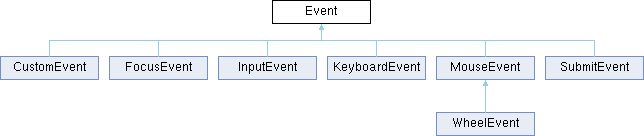
Typed Event Views
Each typed view provides access to properties specific to that kind of event:
| View | Fields Added |
|---|---|
| AsMouse() | Position, buttons, and modifier keys |
| AsWheel() | Scroll deltas |
| AsKeyboard() | Key, code, and modifier keys |
| AsFocus() | Element gaining or losing focus |
| AsInput() | Edit kind and inserted text |
| AsSubmit() | Button that submitted the form |
| AsCustom() | String payload |
Calling a view method on an event of a different type returns fallback values rather than failing. If a single callback handles multiple event types, check type() before converting the event.
This listener checks the key pressed during a keyboard event:
Inheritance diagram for Event:
Public Member Functions | |
| Event (ULDOMEvent borrowed) | |
| Wrap an event handle from the C API. | |
| Event (const Event &)=delete | |
| Event & | operator= (const Event &)=delete |
| std::string | type () const |
| Get the event's type (type). | |
| unsigned | eventPhase () const |
| Get the current dispatch phase (eventPhase). | |
| bool | bubbles () const |
| Whether or not the event bubbles up the tree (bubbles). | |
| bool | cancelable () const |
| Whether or not preventDefault() can cancel the event (cancelable). | |
| bool | isTrusted () const |
| Whether or not the event came from user input or the library (isTrusted). | |
| double | timeStamp () const |
| Get the time the event was created (timeStamp). | |
| bool | defaultPrevented () const |
| Whether or not the event was canceled (defaultPrevented). | |
| void | preventDefault () const |
| Cancel the event's default action (preventDefault). | |
| void | stopPropagation () const |
| Stop the event from reaching other targets (stopPropagation). | |
| void | stopImmediatePropagation () const |
| Stop the event from reaching any other listener (stopImmediatePropagation). | |
| Element | target () const |
| Get the element the event was dispatched to (target). | |
| Node | targetNode () const |
| Get the node the event was dispatched to (target). | |
| Element | currentTarget () const |
| Get the element whose listener is running (currentTarget). | |
| MouseEvent | AsMouse () const |
| View this event as a MouseEvent. | |
| WheelEvent | AsWheel () const |
| View this event as a WheelEvent. | |
| KeyboardEvent | AsKeyboard () const |
| View this event as a KeyboardEvent. | |
| FocusEvent | AsFocus () const |
| View this event as a FocusEvent. | |
| InputEvent | AsInput () const |
| View this event as an InputEvent. | |
| SubmitEvent | AsSubmit () const |
| View this event as a SubmitEvent. | |
| CustomEvent | AsCustom () const |
| View this event as a CustomEvent. | |
| ULDOMEvent | raw () const |
| Get the C handle, for passing to the <Ultralight/CAPI/CAPI_DOMEvent.h> functions. | |
Constructor & Destructor Documentation
◆ Event() [1/2]
|
inlineexplicit |
◆ Event() [2/2]
|
delete |
Member Function Documentation
◆ AsCustom()
|
inline |
View this event as a CustomEvent.
◆ AsFocus()
|
inline |
View this event as a FocusEvent.
◆ AsInput()
|
inline |
View this event as an InputEvent.
◆ AsKeyboard()
|
inline |
View this event as a KeyboardEvent.
◆ AsMouse()
|
inline |
View this event as a MouseEvent.
◆ AsSubmit()
|
inline |
View this event as a SubmitEvent.
◆ AsWheel()
|
inline |
View this event as a WheelEvent.
◆ bubbles()
|
inline |
Whether or not the event bubbles up the tree (bubbles).
◆ cancelable()
|
inline |
Whether or not preventDefault() can cancel the event (cancelable).
◆ currentTarget()
|
inline |
Get the element whose listener is running (currentTarget).
- Returns
- Returns the element (empty for a listener on the document or the window).
- Note
- In a delegated listener (see Element::On()), this is the element you added the listener to, not the matched element.
◆ defaultPrevented()
|
inline |
Whether or not the event was canceled (defaultPrevented).
- Returns
- Returns true if a call to preventDefault() canceled the event. A call that had no effect (see preventDefault()) leaves this false.
◆ eventPhase()
|
inline |
Get the current dispatch phase (eventPhase).
- Returns
- Returns 1 while capturing, 2 at the target, or 3 while bubbling.
◆ isTrusted()
|
inline |
Whether or not the event came from user input or the library (isTrusted).
Events from user input and the page (eg, load) are trusted. Events dispatched by page script, or with Element::dispatchEvent() or Element::click(), aren't.
◆ operator=()
◆ preventDefault()
|
inline |
Cancel the event's default action (preventDefault).
This stops what the library would do in response to the event (like submitting a form, following a link, or toggling a checkbox).
- Note
- This does nothing if the event isn't cancelable or the listener is passive. Wheel listeners on the window, the document, <html>, and <body> are passive unless you add them with EventListenerFlags::NotPassive (or AddEventListenerOptions::passive set to false).
◆ raw()
|
inline |
Get the C handle, for passing to the <Ultralight/CAPI/CAPI_DOMEvent.h> functions.
- Returns
- Returns the handle (valid only during the callback, like this Event).
◆ stopImmediatePropagation()
|
inline |
Stop the event from reaching any other listener (stopImmediatePropagation).
Unlike stopPropagation(), this also skips the remaining listeners on the current target.
◆ stopPropagation()
|
inline |
Stop the event from reaching other targets (stopPropagation).
The remaining listeners on the current target still run.
◆ target()
|
inline |
Get the element the event was dispatched to (target).
- Returns
- Returns the target (empty if it isn't an element, like the document for page load). Use targetNode() for a target that may be a text node.
◆ targetNode()
|
inline |
Get the node the event was dispatched to (target).
Use this instead of target() when the target can be a text node or another node that isn't an element.
- Returns
- Returns the target (empty if it's the document or the window).
◆ timeStamp()
|
inline |
Get the time the event was created (timeStamp).
- Returns
- Returns the time in milliseconds, measured from when the page started loading (the same clock as the page's performance.now()).
◆ type()
|
inline |
Get the event's type (type).
- Returns
- Returns the type (eg, click).
The documentation for this class was generated from the following files: